
By BHTechHub | Updated: January 2026
The HDD vs SSD vs NVMe comparison is one of the most critical factors when building a PC or upgrading a laptop in 2026. While processor speeds have plateaued slightly, storage technology has skyrocketed. Is your system feeling sluggish? Understanding the differences between these three drive types is the fastest way to fix it.
This guide breaks down the differences between Hard Disk Drives (HDD), SATA Solid State Drives (SSD), and Non-Volatile Memory Express (NVMe) to help you decide which is best for gaming, work, and your wallet.
Table of Contents
The Contenders: What’s the Difference?
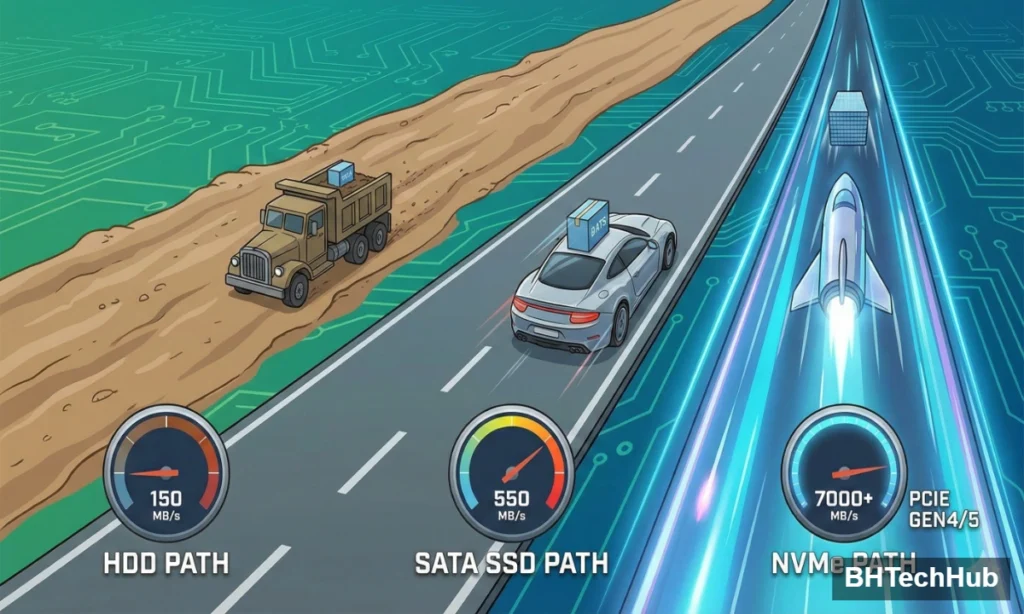
The Contenders: HDD vs SSD vs NVMe Explained Before we talk about raw speed benchmarks, let’s define exactly what we are looking at in this HDD vs SSD vs NVMe breakdown.”
1. HDD (Hard Disk Drive)
- The Technology: Uses spinning magnetic platters and a moving read/write head (like a record player).
- The Vibe: Old-school, bulky, mechanical.
- Best Feature: Massive storage capacity for a low price.
2. SATA SSD (Solid State Drive)
- The Technology: Uses NAND flash memory (like a USB stick) but connects via the older SATA interface.
- The Vibe: Silent, reliable, and significantly faster than an HDD.
- Best Feature: Reviving old laptops and budget builds.
3. NVMe SSD (Non-Volatile Memory Express)
- The Technology: Uses flash memory but connects directly to the CPU via the PCIe lane (the same fast lane your graphics card uses).
- The Vibe: Blazing fast, tiny stick form factor (M.2).
- Best Feature: Unmatched speed for modern gaming and heavy workloads.
Head-to-Head Comparison
1. Speed: The Gap is Massive
In 2026, speed isn’t just about boot times; it’s about how fast your system feels.
| Drive Type | Interface | Max Read Speed (Approx.) | Real-World Feel |
| HDD | SATA III | ~160 MB/s | Slow boot, laggy game loads. |
| SATA SSD | SATA III | ~560 MB/s | Snappy boot, decent loads. |
| NVMe (Gen 4/5) | PCIe 4.0/5.0 | 7,000 – 14,000 MB/s | Instant boot, near-zero load times. |
Winner: NVMe by a landslide. It is roughly 40x to 80x faster than a traditional HDD.
2. Gaming Performance
If you are playing modern titles like GTA 6 or Call of Duty, storage matters. Modern games use technologies like DirectStorage, which allows the GPU to pull data directly from an NVMe drive.
“If you are playing modern titles like GTA 6: Release Date & Features, storage matters. Modern games use technologies like DirectStorage…”
- HDD: Textures may pop in late, and load times can take minutes.
- NVMe: Essential for seamless open-world traversal and instant loading.
Winner: NVMe is virtually mandatory for high-end gaming in 2026.
3. Price & Value (The 2026 Market Reality)
Here is the catch. In late 2025 and early 2026, SSD prices spiked due to component shortages driven by AI data center demand.
- HDD: Remains the cheapest option per Gigabyte (GB). You can get an 8TB HDD for the price of a 2TB NVMe.
- SSD/NVMe: Prices have risen. While still affordable for 1TB drives, high-capacity (4TB+) NVMe drives are currently at a premium.
Winner: HDD for pure value per GB; NVMe for value per performance.
The Verdict: Which Should You Buy?
Best for Operating Systems & Gaming: NVMe M.2 SSD
If you have a modern motherboard, there is no excuse not to use an NVMe drive for your Windows/Linux OS and your main games. The Gen 4 drives (like the Samsung 990 Pro or WD Black SN850X) offer the sweet spot of price-to-performance right now.
Best for Budget Upgrades: SATA SSD
If you have an older laptop or desktop that doesn’t have an M.2 slot, a SATA SSD is a miracle worker. It will make a 5-year-old computer feel brand new for under $50.
Best for Media Hoarders & Backups: HDD
Do you store 4K movies, raw video footage, or backups of your entire PC? Don’t waste expensive NVMe space on cold files. A traditional 7200RPM HDD is still the king of mass storage.
2026 Pro Tip: The “Hybrid” Setup
Due to rising SSD prices, the “Hybrid” setup is making a comeback.
- Drive C: (NVMe – 1TB): Install Windows and your top 3 favorite games here.
- Drive D: (HDD – 4TB+): Store photos, videos, documents, and older games here.
Conclusion
If you can only buy one drive, buy an NVMe SSD. The speed difference transforms the entire computing experience. However, don’t throw away the idea of the humble HDD—in an era of rising component costs, it remains the unsung hero of digital hoarding.
Would you like me to…
- Generate a Meta Description (160 characters) for this post?
- Create Social Media captions (Twitter/LinkedIn) to promote this article?
- Draft a Comparison Table HTML code snippet for your WordPress/CMS?
Pingback: 10 Essential Keyboard Shortcuts Everyone Should Know to Save Hours
Pingback: The Easiest Way: How to Download YouTube Videos to Computer (2025)
Pingback: Master Your Clicks: Top 10 Computer Mouse Tips for Productivity and Comfort - BH Tech Hub
Comments are closed.