
Color is one of the most powerful tools in a web designer’s arsenal. It dictates mood, guides user attention, and strengthens brand identity. But to harness that power on the web, you need to speak the browser’s language.
Whether you are a seasoned developer or a beginner tweaking your first WordPress site, understanding HTML color codes and names is essential. This guide breaks down how digital color works, the different formats available, and provides a handy reference for the most popular shades.
Table of Contents
How Web Colors Work
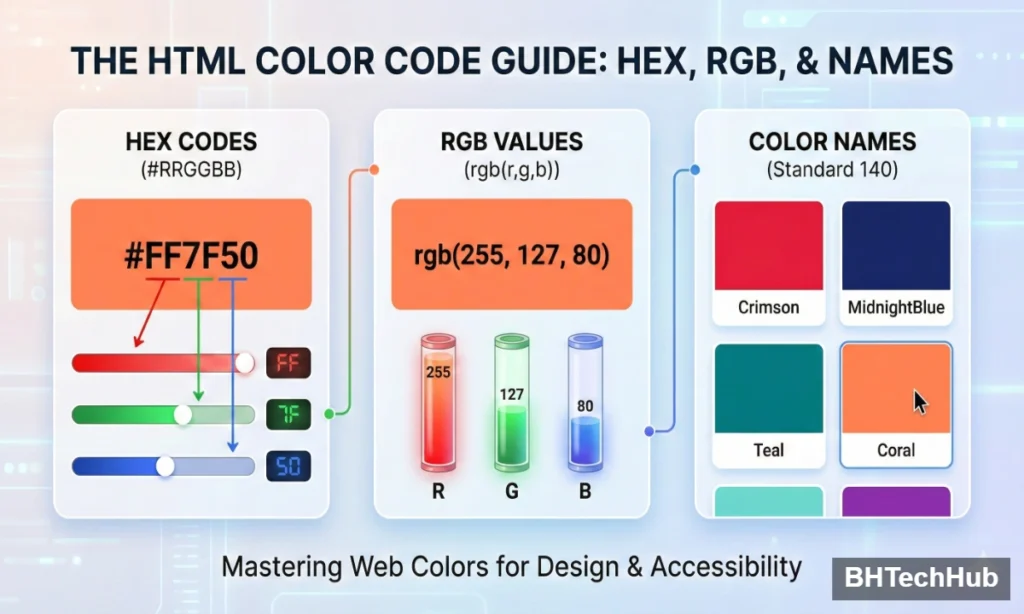
Browsers render colors using specific codes that tell the display how much red, green, and blue light to mix. While there are several ways to write these codes, they all result in the same visual output.
1. Hex Codes (Hexadecimal)
This is the most popular format for web design. A Hex code is a six-digit combination of numbers and letters defined by its mix of Red, Green, and Blue (RGB).
- Format:
#RRGGBB - Range:
0-9andA-F - Example:
#FF5733(A vibrant orange-red).
2. RGB Values
RGB stands for Red, Green, and Blue. Instead of a code, you define the intensity of each color on a scale from 0 to 255.
- Format:
rgb(red, green, blue) - Example:
rgb(255, 87, 51)gives you the same orange-red as above.
3. HTML Color Names
Modern browsers support 140 standard color names. These are English words you can use in your code instead of memorizing numbers. While convenient, they offer less precision than Hex or RGB.
- Example:
Tomato,Teal,WhiteSmoke.
Pro Tip: While color names are easy to remember, professional designers prefer Hex codes or RGBA (which includes transparency) for exact brand matching and consistency across devices.
Essential HTML Color Codes & Names Chart
Below is a cheat sheet of the most commonly used HTML color names, along with their corresponding Hex and RGB values.
| Color Name | Hex Code | RGB Value | Description |
| Black | #000000 | rgb(0, 0, 0) | The complete absence of light. |
| White | #FFFFFF | rgb(255, 255, 255) | The combination of all colors. |
| Red | #FF0000 | rgb(255, 0, 0) | A standard, bright red. |
| Lime | #00FF00 | rgb(0, 255, 0) | The standard digital green. |
| Blue | #0000FF | rgb(0, 0, 255) | The standard digital blue. |
| Yellow | #FFFF00 | rgb(255, 255, 0) | A bright primary yellow. |
| Cyan | #00FFFF | rgb(0, 255, 255) | Also known as Aqua. |
| Magenta | #FF00FF | rgb(255, 0, 255) | Also known as Fuchsia. |
| Silver | #C0C0C0 | rgb(192, 192, 192) | A light gray. |
| Gray | #808080 | rgb(128, 128, 128) | A standard neutral gray. |
| Maroon | #800000 | rgb(128, 0, 0) | A dark brownish-red. |
| Olive | #808000 | rgb(128, 128, 0) | A dark yellowish-green. |
| Purple | #800080 | rgb(128, 0, 128) | A classic rich purple. |
| Teal | #008080 | rgb(0, 128, 128) | A medium blue-green. |
| Navy | #000080 | rgb(0, 0, 128) | A dark blue. |
How to Use Color Codes in CSS
Once you have your code, applying it is simple. You can use these codes in your CSS (Cascading Style Sheets) to style backgrounds, text, borders, and more.
Here is an example of how to apply the color “Coral” (#FF7F50) to a button:
CSS
.my-button {
  background-color: #FF7F50; /* Hex Code */
  color: #FFFFFF;            /* White Text */
  border: 2px solid rgb(255, 127, 80); /* RGB used for border */
}
Understanding Transparency (RGBA)
If you need a color to be see-through (like a modal overlay or a glass-morphism effect), use RGBA. The “A” stands for Alpha, which controls opacity (0.0 is invisible, 1.0 is solid).
CSS
/* A semi-transparent black overlay */
.overlay {
  background-color: rgba(0, 0, 0, 0.5);
}
Best Practices for Web Color
Choosing the right code is only step one. To ensure your website is professional and user-friendly, keep these SEO and UX tips in mind:
- Prioritize Accessibility (Contrast):Ensure there is enough contrast between your text color and background color. Low contrast makes text hard to read for visually impaired users and can hurt your Google Lighthouse score. Tools like the WebAIM Contrast Checker are vital here.
- Stick to a Palette:Don’t use 20 different colors. Choose a primary color, a secondary color, and a few neutral shades (grays, whites). This creates a cohesive visual identity.
- Use Semantic Names Wisely:While
DarkBlueis easier to type than#00008B, using Hex codes ensures that if you decide to change “DarkBlue” to a slightly lighter custom navy later, you only have to change the Hex code variable in your CSS file.
Conclusion
Mastering HTML color codes gives you complete control over your website’s design. Whether you prefer the precision of Hex codes, the logic of RGB, or the simplicity of standard Color Names, you now have the knowledge to style your web pages with confidence.
Start experimenting with different combinations today to find the perfect look for your brand!
How to Check Which GPU Is Installed on Linux (GUI & Command Line)