
Apple just dropped the highly anticipated iOS 26.5 update, and it brings some of the most sought-after privacy upgrades and quality-of-life enhancements to the iPhone ecosystem. Whether you are tired of unsecure group chats with Android users or just want a fresh look for your Lock Screen, this update has something for everyone.
If you are wondering whether you should hit that download button, we have broken down everything you need to know about the latest Apple update, from encrypted RCS messaging to new Apple Maps features.
Table of Contents
What’s New in iOS 26.5? The Standout Features
While we are all looking forward to the massive AI overhauls rumored for iOS 27 at WWDC next month, iOS 26.5 serves as a robust and feature-packed update to keep your iPhone running beautifully. Here are the top features included in this release:
1. End-to-End Encrypted RCS Messaging (Beta)
The days of unsecure cross-platform texting are finally over. Following Apple’s adoption of the RCS (Rich Communication Services) standard to replace aging SMS, iOS 26.5 takes it a step further by introducing end-to-end encryption (E2EE) for RCS chats between iPhone and Android users.
- How it works: When both the sender and receiver are on a supported mobile carrier and using the latest messaging apps, a small lock icon will appear in the chat. This guarantees that your texts, high-quality photos, and videos cannot be intercepted by third parties.
- Note: This feature is rolling out gradually in beta and is enabled by default in your Messages settings.
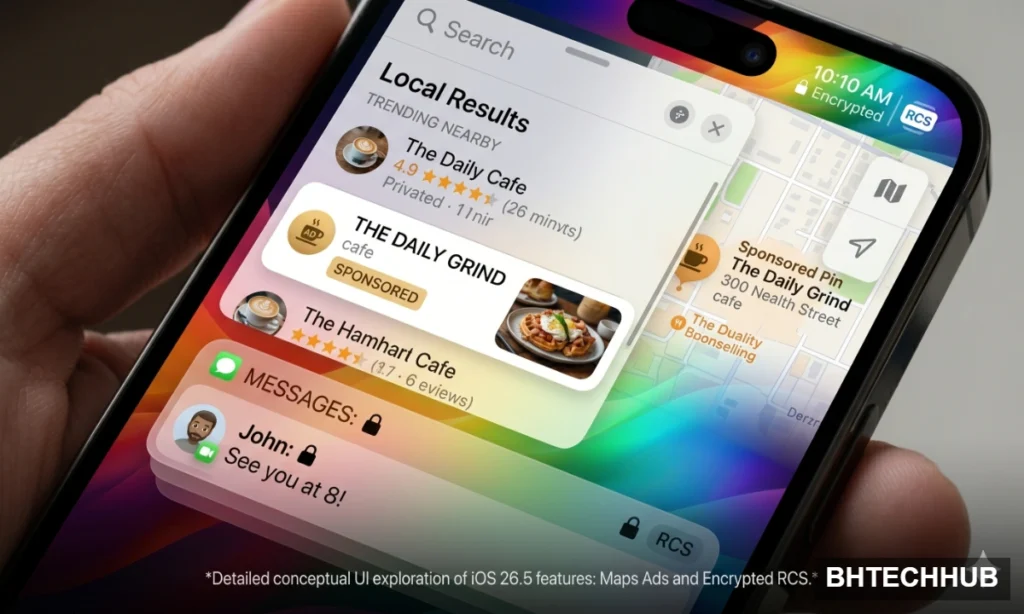
2. Smarter Discovery in Apple Maps
Apple Maps continues to evolve into a powerful discovery engine. With iOS 26.5, you will find a brand-new “Suggested Places” section. Using your recent search history and nearby trending locations, Maps now proactively recommends coffee shops, restaurants, and local hotspots.
Additionally, this update reportedly lays the backend groundwork for sponsored listings and ads within Apple Maps, which will be clearly labeled to distinguish them from organic search results.
3. The New “Pride Luminance” Wallpaper
Customization fans will love the new Pride Luminance dynamic wallpaper. Designed to match the newest Apple Watch face and band, this stunning wallpaper dynamically refracts a vibrant spectrum of colors as you move or unlock your iPhone. It is highly customizable, allowing you to pick your favorite color combinations for a deeply personalized Lock Screen experience.
4. Accessibility and Security Improvements
Under the hood, iOS 26.5 brings several necessary patches and system refinements:
- Motion Sensitivity Fixes: For users sensitive to on-screen motion, a new setting more reliably reduces the animations of the “Liquid Glass” design language.
- Keyboard & Peripherals: Includes a new Inuktitut keyboard layout and makes Bluetooth pairing much easier for accessories. If you are a power user juggling mobile devices and desktop setups, check out our recent PC hardware optimization and GPU guide to keep your entire workstation running smoothly.
- Security: Patches over 50 security vulnerabilities to keep your device safe. You can read the full list of CVEs addressed on Apple’s official security releases page.
Is Your iPhone Compatible? iOS 26.5 Supported Devices
The iOS 26.5 update is available as a free over-the-air download for the following devices:
- iPhone 17 series
- iPhone 16 series
- iPhone 15 series
- iPhone 14 series
- iPhone 13 series
- iPhone 12 series
- iPhone 11 series
- iPhone SE (2nd generation and later)
For users on older, unsupported models, Apple has also pushed out minor security patches (like iOS 18.7.9 and iOS 16.7.16) to ensure legacy devices stay protected.
How to Download and Install the iOS 26.5 Update
Ready to upgrade your iPhone experience? Installing the latest software is incredibly straightforward:
- Ensure your iPhone is connected to Wi-Fi and has at least 50% battery (or plug it into a charger).
- Open the Settings app.
- Tap on General.
- Select Software Update.
- Tap Update Now and follow the on-screen prompts to download and install iOS 26.5.
The Bottom Line
The Apple iOS 26.5 update might be one of the final major checkpoints before iOS 27, but it delivers massive value. By securing cross-platform chats with encrypted RCS and making local discovery easier with Apple Maps, it proves that Apple is still focused on refining the day-to-day iPhone experience.
Have you installed iOS 26.5 yet? Let us know how the encrypted RCS messaging is working for you in the comments below!
Read More:Massive Forza Horizon 6 Leak Drops Just Days Before Official Release
Pingback: PUBG Mobile 4.4 Update: Unleash the Epic Hero's Crown Features & Downloads
Comments are closed.