
If you are wondering exactly how to use Nano Banana, Google’s revolutionary AI image generator, you are in the right place. Developed by Google DeepMind and built on the Gemini architecture, this tool is entirely changing how creators, marketers, and developers approach visual content. Unlike older diffusion models…
Unlike older diffusion models that require complex prompting or tedious manual masking, Nano Banana acts like a collaborative digital artist. It processes text and images simultaneously, allowing for seamless conversational editing, unparalleled character consistency, and razor-sharp text rendering.
Ready to level up your visual content? Here is everything you need to know about how to use Nano Banana effectively.
Table of Contents
What is Nano Banana?
Nano Banana is Google’s state-of-the-art multimodal AI image generation and editing model. While traditional AI generators create images from scratch based on a text prompt, Nano Banana excels at image-to-image editing and multi-image reasoning.
Whether you are using the lightning-fast Nano Banana 2 or the reasoning-heavy Nano Banana Pro, the core capabilities include:
- Prompt-Based Local Edits: Change specific parts of an image (like swapping a background or changing an outfit) using natural language, without needing lasso tools or masks.
- Subject & Character Consistency: Upload reference photos and maintain a character’s exact facial identity, lighting, and texture across entirely different scenes.
- Multi-Image Fusion: Combine up to 14 reference images to merge subjects, transfer artistic styles, or build complex compositions.
- Precision Text Rendering: Generate accurate, legible text on signs, products, or posters in multiple languages.
Step-by-Step: How to Use Nano Banana
Whether you are accessing Nano Banana through the Gemini app, Google AI Studio, or third-party platforms like Artlist and Banana AI, the workflow is highly intuitive.
Step 1: Start with Your Inputs
Nano Banana thrives on context. You can start entirely from scratch with a text prompt, but the model truly shines when you provide visual references.
- Upload Your Base Image: Drag and drop your primary photo (JPEG, PNG, or WebP).
- Add References (Optional): If you want to transfer a specific art style or insert a specific character, upload those images as well.
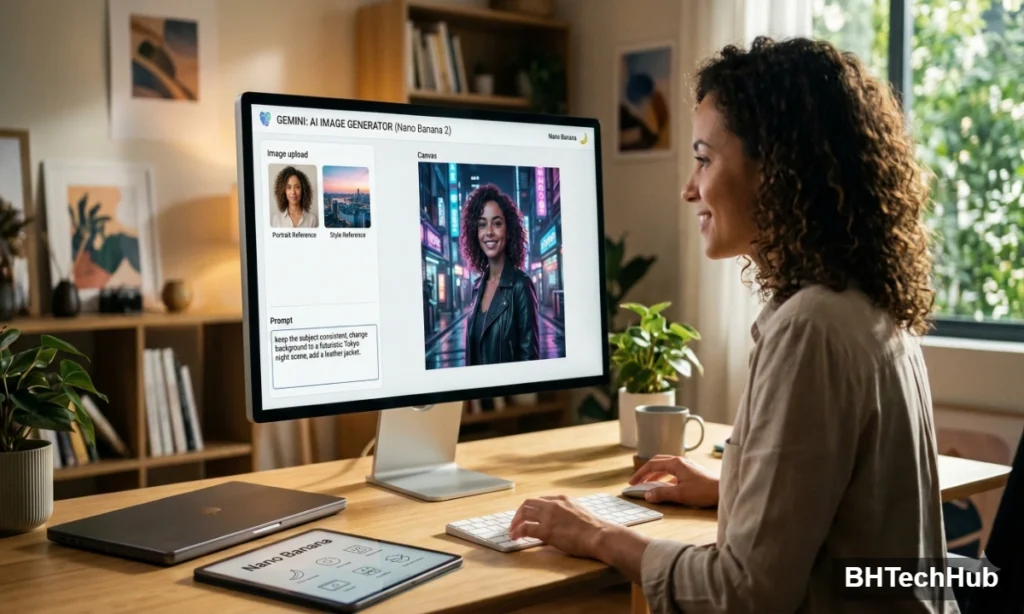
Step 2: Write a Natural Language Prompt
You don’t need a degree in “prompt engineering” to use Nano Banana. Speak to it conversationally.
- For Generation: “Create a cinematic, wide-angle shot of a futuristic city at sunset. The lighting should be moody, with neon pink and blue reflections.”
- For Editing: Focus on what needs to change and what should stay the same. “Keep the subject exactly as is, but change the background to a bustling Tokyo street at night. Add a leather jacket to the character.”
Step 3: Utilize Semantic Editing (No Masks Required)
If you want to remove an object, just say so. Nano Banana uses deep reasoning to understand your image. A prompt like “Remove the coffee cup from the table and replace it with a potted succulent” is all you need. The model will automatically handle the shadows, reflections, and perspective.
Step 4: Refine and Iterate
One of the biggest advantages of Nano Banana is its conversational memory. If the first result isn’t perfect, you don’t have to start over. Simply reply with a tweak: “Make the lighting a bit warmer,” or “Zoom out to show more of the landscape.”
Pro Tips for Getting the Best Results
To truly master Nano Banana, keep these advanced techniques in mind:
- Lock in Your Style: When generating brand assets, upload a mood board or an existing brand image and add the prompt: “Apply the exact artistic style, color palette, and texture of the reference image to this new generation.”
- Master Text Generation: Nano Banana handles text beautifully if you are specific. Use quotes and specify the font style: “Render the text ‘SUMMER SALE’ in a bold, retro-style orange font across the top.”
- Control the Camera: Treat the AI like a photographer. Use terms like macro shot, bird’s-eye view, soft studio lighting, or shallow depth of field to dictate the exact vibe of the image.
Conclusion
Nano Banana is shifting AI image creation away from random slot-machine generation and towards precise, intentional design. By mastering natural language prompts and leveraging its powerful multi-image capabilities, you can cut your design time in half while maintaining professional, studio-quality consistency
“Nano Banana is built on the powerful foundation of Google DeepMind’s Gemini architecture, which is constantly pushing the boundaries of what multimodal AI can do.”
“If you are upgrading your workstation to handle heavy AI and design workflows, check out our latest PC hardware and optimization guides on BHTechHub.”