
f you have been waiting for WhatsApp multiple accounts iOS support, the wait is officially over. Juggling two iPhones just to keep your personal and work messages separate is frustrating, but Meta has finally rolled out a native, built-in solution for Apple users.
But there is good news grounded in reality: the wait is officially over.
As of March 2026, Meta has rolled out a massive update for WhatsApp on iOS. The headline feature is the highly anticipated multiple accounts support, but the update also brings a slew of AI upgrades and quality-of-life improvements. Let’s dive into what’s new and how you can make the most of your updated app.
Table of Contents
The Wait is Over: Dual WhatsApp Accounts on One iPhone
Up until now, running two WhatsApp numbers on an iPhone required downloading the separate WhatsApp Business app. While functional, it wasn’t a true native solution for everyday users.
With the latest update, you can now log into two separate WhatsApp accounts within the standard iOS app. ### Key Benefits of iOS Multi-Account Support:
- True Separation: Keep your work and personal life entirely distinct without needing two physical phones.
- Easy Switching: You don’t have to log out. A simple tap lets you instantly swap between profiles.
- Clear Indicators: WhatsApp now displays your active profile picture in the bottom navigation tab, so you always know which account you are messaging from.
- Independent Settings: Each account maintains its own chat history, notification preferences, and privacy configurations.
Note: The app currently supports a maximum of two accounts. If you manage three or more numbers, you will still need an alternative solution or a second device.
How to Set Up a Second WhatsApp Account on iOS
Setting up your secondary account is incredibly straightforward. Ensure your app is updated to the latest version via the App Store, then follow these steps:
- Open WhatsApp and go to Settings.
- Tap the “+” (Plus) icon or select the new Account List section next to your name/QR code.
- Tap Add Account and agree to the Terms of Service.
- Enter your second phone number and select your country.
- Verify the number using the six-digit SMS code.
- Set up your profile name and picture.
Once activated, you can switch between accounts by long-pressing or double-tapping the Settings tab.
More Than Just Dual Accounts: 4 Massive iOS Updates
While multi-account support steals the spotlight, Meta bundled several other highly requested features into this iOS rollout.
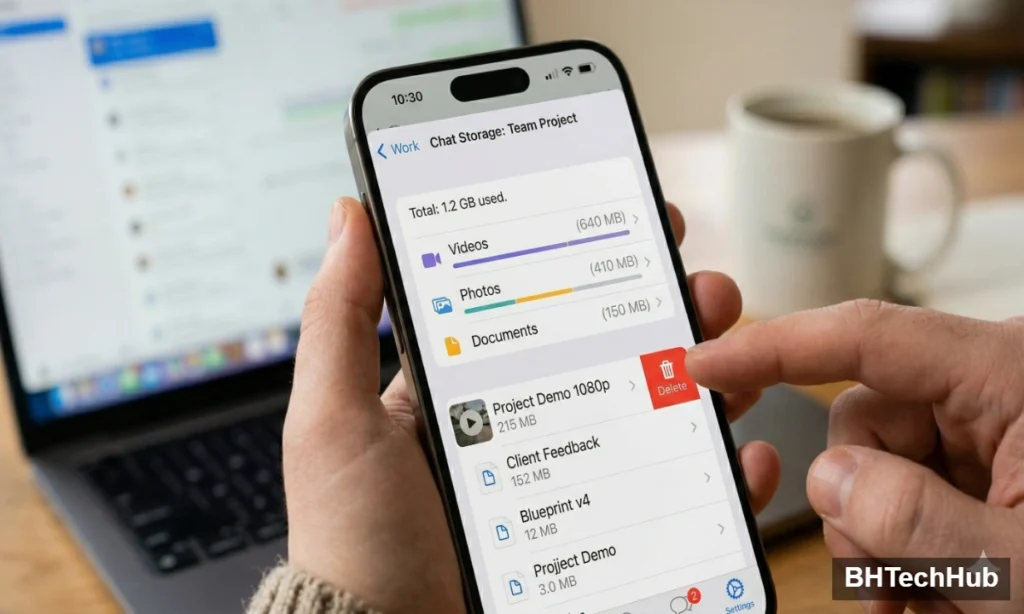
1. Granular Storage Management
If you’ve ever deleted an entire chat just to free up iCloud space, this update is for you. WhatsApp now allows you to manage storage within specific chats. By tapping a contact’s name and selecting Manage Storage, you can hunt down and delete large files (like 4K videos or heavy documents) while keeping your text history completely intact.
2. Seamless iOS to Android Chat Transfers
Changing operating systems used to mean risking your entire message history. WhatsApp has officially streamlined cross-platform transfers. You can now securely move your chats, photos, and videos from an iPhone to an Android device over a local Wi-Fi connection—no third-party software required.
The Impact of WhatsApp Multiple Accounts iOS Integration For years, readers here at BHTechHub have asked how to run two numbers on one iPhone without relying on the Business app workaround. The introduction of native WhatsApp multiple accounts iOS capabilities means you get true separation between your personal and professional life. You can finally manage everything within the standard app you already use every day.
3. Meta AI Gets Smarter (Photo Editing & Writing Help)
Meta is heavily leaning into generative AI, integrating it directly into your chat interface.
- AI Photo Editing: You can now touch up photos right inside the chat box before sending them. Use Meta AI to remove distracting background objects, swap backgrounds entirely, or apply creative artistic styles.
- AI Writing Help: Struggling to phrase a professional reply? The AI Writing Help tool can now analyze the context of your conversation and draft suggested responses for you, all while keeping the actual chat processing private. (Note: AI features are rolling out gradually and may not be immediately available in all regions).
4. Contextual Sticker Suggestions
To speed up your messaging, WhatsApp will now analyze the emojis you type and instantly suggest larger, expressive stickers that match your mood. It’s a small UI tweak, but it makes chatting significantly faster and more dynamic.
Final Thoughts
WhatsApp’s latest iOS update proves that Meta is finally bringing feature parity between its Android and iPhone apps. By eliminating the need for a second phone and introducing powerful tools for storage and AI, the app is becoming significantly more versatile.
Keep an eye on the App Store; if you don’t see these features yet, they are rolling out globally over the coming weeks.
If you are looking for more ways to optimize your devices, check out our latest guides on smartphone tips and tricks right here on BHTechHub.
Xiaomi Redmi Note 15 Pro Review: The Mid-Range Throne, Decisively Reclaimed